
Shift scheduling software for teams across multiple sites
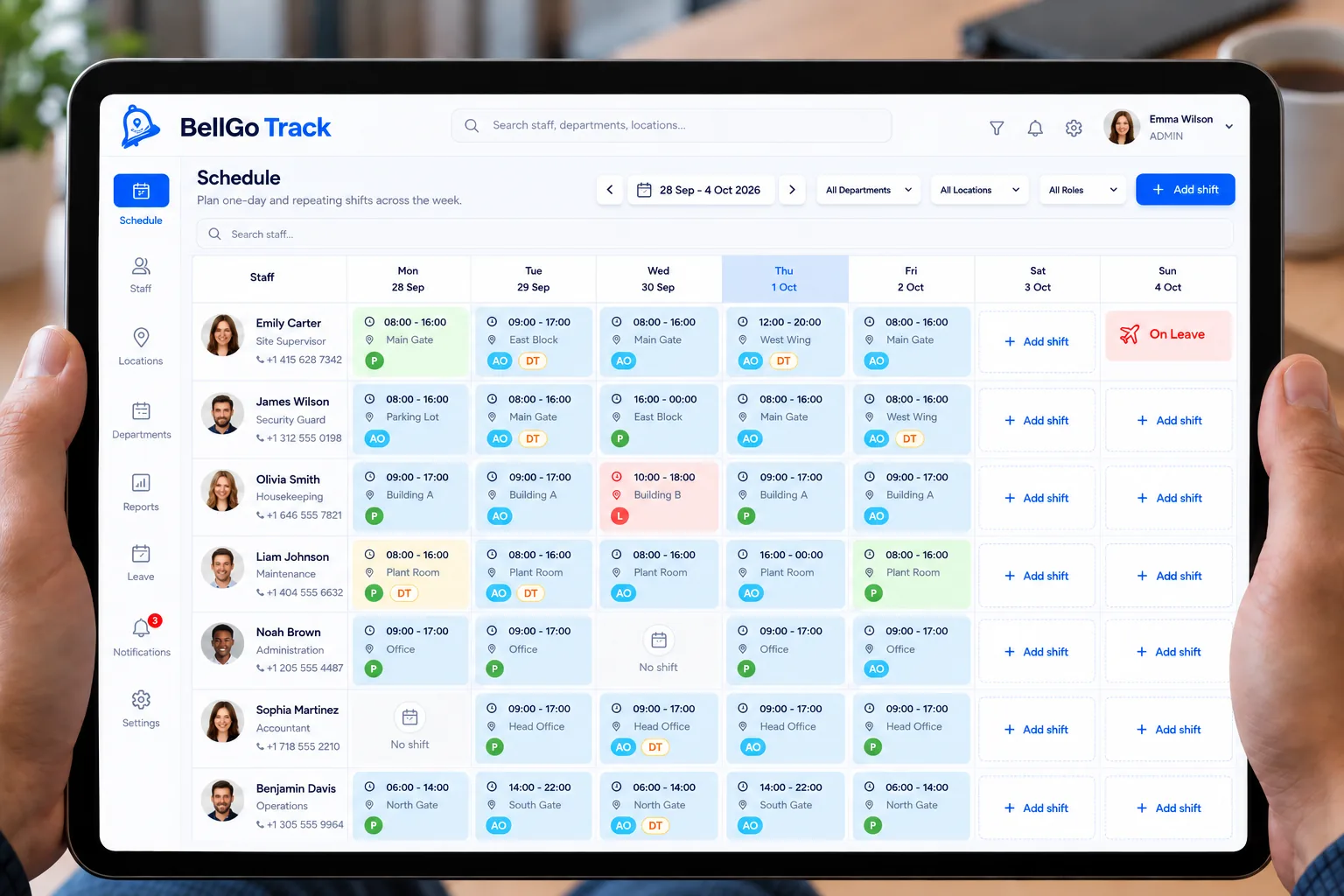
Build the week once and let it repeat. BellGo Track organizes the shift roster by day and by site, shows you where coverage is missing and compares each shift with verified attendance.
- Calendar by day and site
- Weeks that repeat
- Change a single day
Why scheduling shifts in Excel does not scale
Schedules rebuilt every week
Copying and adjusting spreadsheets takes hours, and every change creates a different version.
Coverage gaps
An unstaffed site is discovered once the shift has started, not when the schedule was built.
Schedule and attendance kept apart
The schedule lives in one file and the clock-ins in another, so comparing planned with actual is manual work.
Shift scheduling without spreadsheets
Plan, publish and compare with what actually happened, all in one place.
Visual shift calendar
Place each person by day and site on an interactive calendar.
Repeating patterns
Fixed or rotating shifts carry over to the next week without rebuilding them.
Single-day changes
If one week is different, change only that day without touching the rest of the pattern.
Coverage gaps
Spot sites or posts without staff before the shift starts.
Shift vs. actual attendance
Each shift is compared with the verified clock-in: late arrivals, absences and early departures in plain view.
See the featureScheduled or punched hours
Choose whether payroll pays scheduled or punched hours, with a grace period or rounding.
See the featureHow to build your shifts in BellGo Track
- 1
Create sites and posts
Add where your team works and which posts each site needs to cover.
- 2
Build the first week
Place each person on the calendar by day and site.
- 3
Let it repeat
The pattern copies to the following weeks. Adjust only the days that change.
- 4
Compare with actuals
See live who showed up for their shift and who is missing.
Industries that use it
Security & Guarding
QR and NFC guard tours, face-verified officers and patrol reports ready for your clients.
Learn moreHotels & Hospitality
Department rotas, housekeeping checklists with photos, and night and holiday hours calculated for you.
Learn moreConstruction & Contracting
Geofenced, face-verified crew attendance, safety briefings and photo-logged inspections.
Learn moreCleaning & Facilities
Crews across many sites, task lists per location and photo proof of service for every client.
Learn moreRestaurants & Dining
Split shifts, opening and closing checklists, and break logging for kitchen, bar and floor.
Learn moreCorporate & Commercial
Maintenance, contractors and technicians across buildings in one dashboard, with proof of every job.
Learn moreFrequently asked questions
What is shift scheduling software?
It is a tool to plan who works, when and where. In BellGo Track the schedule is built on a calendar by day and site, repeats every week and connects to attendance and payroll.
Does it handle rotating shifts like 12x36 or 4x4?
Yes. Patterns are built on the calendar and repeat automatically; when one week changes, you adjust only that day.
Can workers see their schedule?
Yes. Each person sees their upcoming shifts in the BellGo Track app on their phone.
Can I schedule shifts across multiple sites?
Yes. The calendar organizes shifts by site, so you see coverage for each location separately.
See BellGo Track with your own operation
A 15-minute walkthrough shaped around how your team works.